



Discover CapCut Pad: The Ultimate Video Editing Experience for iPad Creators
Introduction to CapCut Pad
CapCut has always aimed to make high-quality video creation accessible anytime, anywhere. Recently, the company unveiled CapCut Pad, a new editing experience tailored specifically for iPad users. This innovative tool combines the robustness of desktop editing with the portability of mobile, providing creators with unprecedented flexibility in their video editing processes.
A Game-Changer for iPad Editors
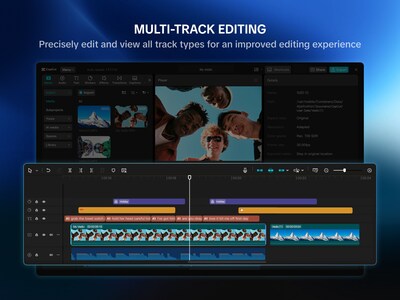
CapCut Pad is designed to transform how creators edit videos on their iPad. The interface has been completely revamped to enhance user experience, making it intuitive and easy to navigate. The addition of multi-track editing allows users to layer videos, audio, and effects seamlessly, giving them greater control over their projects than ever before.
Key Features of CapCut Pad
1. Enhanced Interface: The new layout is optimized for larger screens, making it easier for users to see all elements of their projects at once. The touch-friendly controls allow for more natural interactions, providing a fluid editing experience.
2. Multi-Track Editing: Creators can now work with multiple video and audio tracks simultaneously. This feature is vital for those looking to create complex, layered projects without the constraints that typically come with mobile editing tools.
3. Apple Pencil Support: Soon to be available, this support will enable precise editing capabilities, allowing users to make detailed adjustments with ease. The tactile feedback of the Apple Pencil creates a more engaging editing process.
4. Batch Selection and Fine Controls: CapCut Pad introduces advanced selection tools that enable users to edit multiple clips at once, streamlining workflows. The intuitive control system ensures that even novice editors can manage their projects effectively.
5. Free Features During Trial: All non-AI related capabilities will be accessible for free during the app's trial period, encouraging users to explore the app's full potential without commitment.
Future Developments
CapCut is actively working on integrating AI tools like AI Video Maker and Autocut into the app, promising even more features to enhance the editing experience. Users can expect regular updates with new functionalities rolling out in early 2026.
Who Can Benefit from CapCut Pad?
Traveling Creators: The portability of the iPad, combined with the professional-grade editing tools of CapCut Pad, makes it an ideal choice for creators on the go. Whether editing while in transit or catching inspiration at a shoot, users can craft quality content wherever they are.
Business Professionals: Those needing to create marketing videos or presentations while traveling will find CapCut Pad invaluable. The ability to produce high-quality content swiftly and efficiently can significantly enhance business communications.
Filmmakers and Production Teams: With quick editing capabilities and the option for rapid previews, filmmakers can utilize CapCut Pad on-site to make immediate adjustments, ensuring their projects stay on schedule.
Students and Creatives: Learners looking for a robust editing solution for school projects or creative assignments will benefit from the user-friendly interface and comprehensive toolset that supports all types of projects.
Conclusion
By combining the power of desktop video editing with mobile convenience, CapCut Pad stands out as an essential tool for any creative individual seeking to maintain productivity and inspiration on the go. Available now on the App Store, this innovative app is set to redefine the landscape of mobile editing. Download CapCut Pad today and unlock the potential of video creation on your iPad!
Topics Consumer Products & Retail)
【About Using Articles】
You can freely use the title and article content by linking to the page where the article is posted.
※ Images cannot be used.
【About Links】
Links are free to use.