




Yahoo! Flea Market Launches AI Pricing Feature via LINE for Easy Selling
Yahoo! Flea Market Introduces 'Easy AI Assessment' via LINE
LINE Yahuu has launched a remarkable feature called 'Easy AI Assessment' for its flea market app, Yahoo! Flea Market. By simply sending a photo through the official LINE account, users can receive AI-generated suggestions regarding market prices and product descriptions, streamlining the selling process.
The demand for such a service is evident, as Yahoo! Flea Market has recently reached a milestone of 30 million downloads. This reflects not only the app's popularity but also a 130% increase in listed items compared to the previous year, showcasing its growth across diverse user demographics.
The 'Easy AI Assessment' feature allows users to send a photo of the item they wish to sell via Yahoo! Flea Market's LINE account. The AI promptly analyzes the image, assesses market prices, and categorizes the item before suggesting it back to the user. Besides pricing recommendations, the LINE account also provides information on shipping and packaging options, making it a one-stop solution for potential sellers.
User feedback highlights the pain points many encounter when listing items. Notably, 33% of participants in a survey reported concerns about setting an appropriate selling price as a significant barrier to their selling efforts. This insight underscores the necessity of the new feature, especially as 59% of previous sellers expressed a strong interest in utilizing it. Such data shows that there is a genuine need for tools that lower barriers and encourage users to engage more proactively with the app.
How to Use the 'Easy AI Assessment' Feature
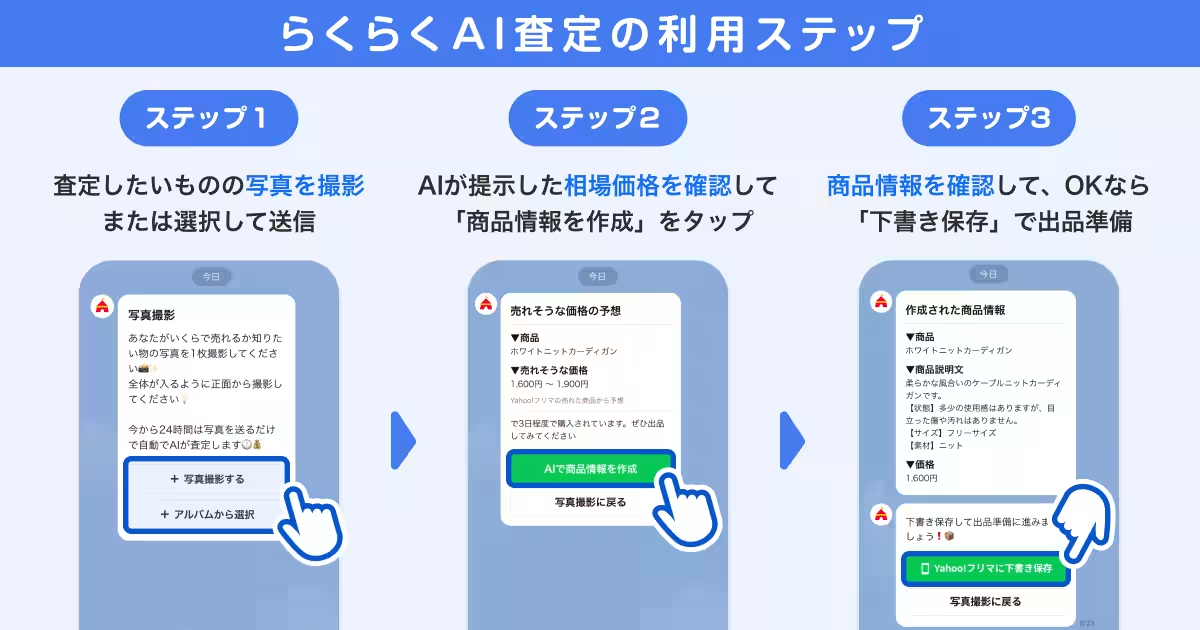
Using this innovative feature is simple:
1. Add the Yahoo! Flea Market LINE Official Account: You can do this by following the link provided (https://yahoo.jp/VX9_7p).
2. Access the Feature: In the chat room, tap on 'Easy AI Assessment' at the bottom of the screen.
3. Send a Photo: Choose to either take a picture or select one from your album.
4. Review the Suggested Price: The AI will provide a suggested market price. Tap on 'Create Product Information' to proceed.
5. Confirm and Save: After reviewing the suggested product details, you can save it as a draft to finish listing through the Yahoo! Flea Market app.
Important Notes
- - After creating a draft, users must ensure to double-check the auto-filled selling price before finalizing their listing.
- - The feature operates under LINE Yahu's common user agreement, with a disclaimer regarding reliability and precision of AI output results.
- - This functionality utilizes Google Cloud's Vertex AI and follows its service policy.
The introduction of this AI feature is in line with LINE Yahu's mission to create a 'WOW' life platform that adds excitement to everyday experiences. By providing services characterized by low selling fees, speedy sales, and smooth transactions, Yahoo! Flea Market aims to enhance the overall experience for both sellers and buyers, ensuring a safe and convenient marketplace.
This feature is a significant step towards making online selling accessible and user-friendly, especially for those who may feel overwhelmed by the complexities of flea market transactions. As the popularity of online marketplaces continues to grow, innovations like 'Easy AI Assessment' will undoubtedly pave the way for more users to join the selling community.


Topics Consumer Products & Retail)
【About Using Articles】
You can freely use the title and article content by linking to the page where the article is posted.
※ Images cannot be used.
【About Links】
Links are free to use.