



Introducing CapCut Pad - A Revolutionary iPad Editing Experience for Creators
Discover the CapCut Pad: Elevate Editing on the Go
CapCut is changing the game for video creators with its latest launch: the CapCut Pad, a powerful tool designed specifically for iPad users. This innovative editing experience combines the robust functionality of desktop platforms with the portability of a tablet, making it easier for creators to edit videos wherever inspiration strikes.
A New Era of Editing
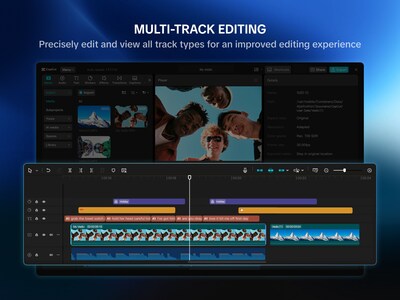
In the fast-paced world of content creation, having the right tools is essential. CapCut Pad offers a completely reimagined interface that caters to the needs of iPad creators. With its multi-track editing capabilities, users can layer videos, audio, and effects for a more controlled editing process. This means creators can not only make quick edits but also tackle more complex projects with ease.
Features That Stand Out
The CapCut Pad is packed with features that enhance usability:
- - Redesigned Interface: The new layout is optimized for larger screens, making navigation intuitively simple.
- - Multi-Track Editing: Creators can freely combine video clips, audio tracks, and additional overlays to produce enriched content.
- - Apple Pencil Support: This feature allows for precise editing, making it easier to adjust elements on screen.
- - Batch Selection: Streamlined controls mean smoother editing sessions and the ability to quickly select and modify multiple clips at once.
During its testing phase, all non-AI functions are offered free of charge, allowing users to access powerful tools without the worry of a subscription. CapCut is also working on introducing AI-driven features like AI Video Maker and Autocut, set to enhance editing workflows further, with updates rolled out starting early 2026.
Designed for Versatile Use
CapCut Pad is ideal for a variety of users:
- - Traveling Creators: Whether on the go or shooting content, this tool provides everything needed for professional editing.
- - Commercial Users: Business people can craft stunning marketing videos or presentations while traveling.
- - Filmmakers: Teams on set can prepare rapid cuts and previews, facilitating efficient production workflows.
- - Students: The app encourages educational creativity, perfect for projects and assignments.
The blend of professional desktop features with mobile convenience helps users remain motivated and productive, regardless of their location.
Available Now
CapCut Pad is now available for download on the App Store in most regions. Since its foundation in February, it builds upon the desktop version while continuously integrating iPad-specific features. The CapCut team eagerly anticipates seeing what the community will create using this exciting new platform.
So, why wait? Transform your iPad into a versatile editing workstation with CapCut Pad today!
For a closer look at the capabilities of the CapCut Pad, click here for images and more.
Topics Consumer Technology)






【About Using Articles】
You can freely use the title and article content by linking to the page where the article is posted.
※ Images cannot be used.
【About Links】
Links are free to use.