



Accelerating Large-Scale Operations with SharePoint DocLib Management Tool: Official Release
Enhancing Efficiency with SharePoint DocLib Management Tool
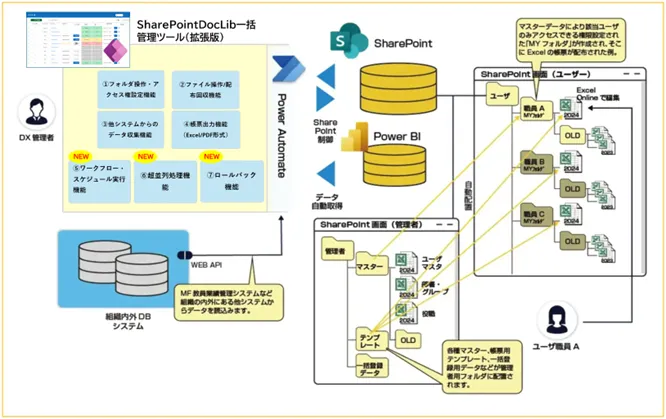
The educational institutions, enterprises, and governmental organizations utilizing Microsoft 365's SharePoint as their operational foundation are increasingly facing challenges due to growing numbers of users. These challenges include the complexity of managing folder setups and permissions, as well as significant issues arising from configuration errors. In response to these pressing needs, Media Fusion Co., Ltd., headquartered in Osaka, has officially launched the upgraded "SharePoint DocLib Management Tool." This powerful tool leverages SharePoint alongside Excel Online to facilitate the construction of business systems within the MS365 environment.
Key Features of the Tool
1. Unmatched Speed and Stability
The innovative hyper-parallel processing engine allows the tool to handle environments with tens of thousands of users while efficiently avoiding any limits (PPR). This results in prompt and reliable execution of large-scale tasks.
- - Standard Configuration: The tool can create thousands of folders and set permissions without hitting API restrictions, ensuring smooth operations.
- - High-Speed Options with Azure Integration: This optional feature is aimed at high-level processing tasks that involve extensive file distribution and data mapping to Excel. By expanding parallel execution units, the tool can create individual files for 10,000 users and distribute documents to their personal folders in approximately 30 minutes. This presents a significant advantage for time-sensitive tasks such as distributing e-portfolio materials for large universities or feedback for employee evaluations.
2. No-Code Workflow Definition with Action Groups
Users can freely combine actions like folder creation, permission granting, and file copying into custom-defined action groups. This no-code feature facilitates the automation of complex organizational workflows essential for HR assessments and e-portfolio creation.
3. Reliable Rollback Functionality
All actions performed—whether creating, copying, moving, or configuring permissions—can be undone with a single button click. This recovery feature significantly reduces the psychological burden on administrators, allowing them to rectify any human errors that may occur.
Addressing the Challenges of Large-Scale Operations
As organizations strive to leverage SharePoint for digital transformation (DX), they encounter the following major obstacles:
- - Large-scale folder distribution
- - Common mistakes in permission settings
- - Processing interruptions due to API limits
The SharePoint DocLib Management Tool addresses these bottlenecks with its focus on speeding up processes, automating tasks, and providing rollback capabilities, thereby relieving the operational burden on staff.
Ideal Use Cases
- - Educational Institutions: Efficient distribution and collection of documents related to faculty evaluations. The tool can create folders for students to accumulate activity records and achievements for their e-portfolios and automatically assign appropriate viewing and editing rights.
- - Enterprises and Public Sector: Management of human resources evaluations, enterprise portfolios (skill management and talent management), and comprehensive management of HR and labor documents.
Product Overview
Product Name: SharePoint DocLib Management Tool (Extended Version)
Main Features:
- - Bulk folder operations, permissions setting, and verification for user folders.
- - File handling, distribution, retrieval, access rights management, and verification.
- - Standard capability to collect data from the company's MF teaching performance management system, with extensibility using Power Automate.
- - Output of reports in Excel/PDF format, alongside the ability to extract data from Excel using the company’s reporting tool, CabineX for MS365.
New Features
1. Hyper-Parallel Processing Functionality for Large Users: Standard support for thousands of users, with high-speed options allowing for rapid processing for large organizations even with tens of thousands of user folders.
2. Workflow and Schedule Execution Functionality: Register various document library operations as workflows allowing both manual and automated scheduling.
3. Rollback Feature: Ability to undo bulk actions (create, copy, move, permissions settings), instantly restoring the previous state in case of configuration errors.
This package is aimed at system administrators operating Microsoft 365 (SharePoint) environments across companies, universities, and research institutions. Pricing options are available upon inquiry.
For more detailed product information, check out the product video and specifications on our official site. Media Fusion is committed to leveraging Microsoft 365 towards SEaaS (SaaS Extension as a Service) to enhance digital transformation efforts for organizations.
About Media Fusion Co., Ltd.
Founded in 1995, Media Fusion aims to improve operations in educational and public institutions through modern SaaS offerings, contributing to the digital transformation of businesses and organizations. Our headquarters are in Osaka, and our Tokyo office continues to provide comprehensive support across Japan and globally.
For further inquiries, feel free to reach out to us via our contact page.
Topics Consumer Technology)

【About Using Articles】
You can freely use the title and article content by linking to the page where the article is posted.
※ Images cannot be used.
【About Links】
Links are free to use.