



Transforming Business Systems Easily with Microsoft 365 Power Apps Automation Tool
Streamlining Business System Development with Power Apps
Introduction
In today’s fast-paced business environment, organizations are constantly looking for ways to enhance efficiency and reduce operational costs. Media Fusion Co., Ltd. based in Osaka, Japan, is set to release an innovative new product in March 2026—the "Power Apps Automated Screen Generation Tool". This low-code solution promises to revolutionize how companies, universities, and research institutions manage and create business applications through Microsoft 365. Leveraging Excel design documents, this tool aims to automate the generation of input screens in Power Apps, making development more accessible and less time-consuming.
The Challenges of Low-Code Development
While low-code and no-code tools have gained traction due to their rapid deployment capabilities and cost-effectiveness, they inherently come with challenges. Notably, many of these tools still require specialized knowledge for scripting and configuration. Tasks such as updating or adding data fields typically necessitate engineering support. Additionally, users of Microsoft 365 may find that they still need to purchase additional licenses for certain features or integrations, a hurdle that could diminish the returns on investment in low-code platforms.
Introducing the Power Apps Automated Screen Generation Tool
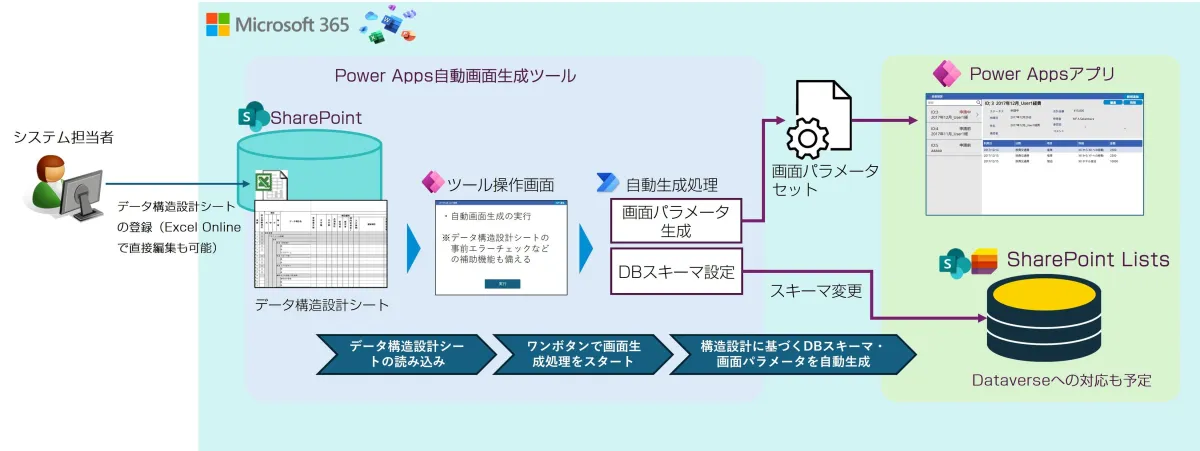
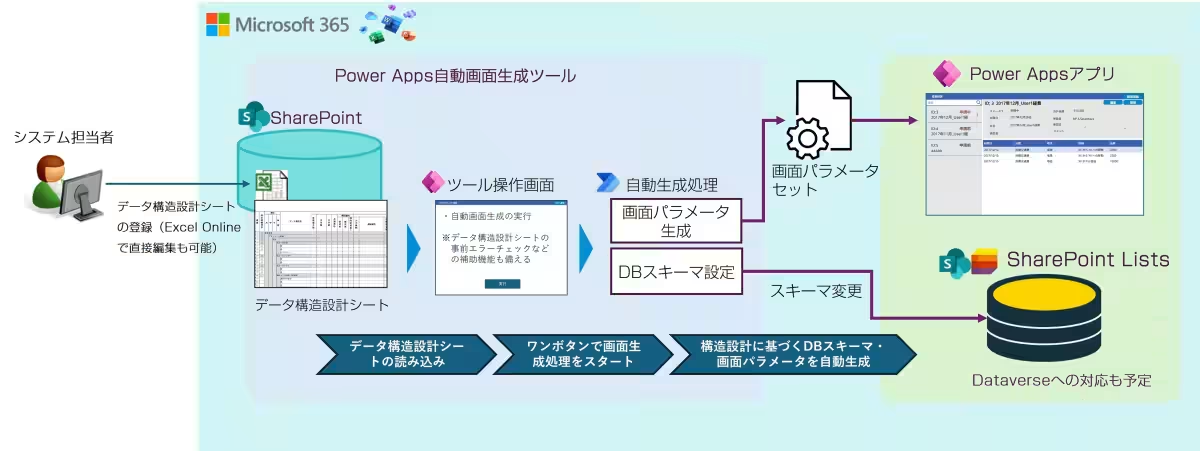
To address these prevalent challenges, Media Fusion's upcoming tool aims to streamline the development process significantly. This innovative tool has been adapted from technology previously employed in their "MF Teacher Achievement Management System". By importing a data structure design sheet defined in Excel, system administrators can automatically generate screens and corresponding databases in Power Apps. Moreover, this tool allows for easy modifications to existing data structures during operation, enhancing flexibility.
Workflow of Screen Generation
By utilizing the Power Apps Automated Screen Generation Tool, businesses can enjoy a plethora of benefits, including:
- - No Need for Engineering Support: System administrators can manage changes without requiring extensive technical knowledge.
- - Automated Data Structure Changes: Updating the Excel design document triggers automatic updates to screens, databases, and data transformations, with the ability to test changes before implementation.
- - Database Selection: The tool defaults to using SharePoint Lists, eliminating the need for extra licenses. It supports multiple Lists for parallel processing and can accommodate structured data, with future support for Dataverse planned (which may require additional licensing).
Key Features of the Power Apps Automated Screen Generation Tool
1. Data Structure Design Sheet: Define structure, permissions, and input restrictions using Excel.
2. Data Structure Design Test Functionality: Verify structural changes before reflecting them in a production system.
3. Automatic Screen Generation Function: Generate screens directly from the data structure design sheet, with standard templates including list view and detail display/input.
4. Database Schema Setting: Standard use of Lists, with future integration for Dataverse.
5. Data Conversion Functionality: Automatically transform old data structures into new ones while in maintenance mode.
Implementation Details
The tool will be made available as an administrator interface, packaged for system administrators to operate seamlessly. With SharePoint Lists as a critical component, businesses will need to rely on SharePoint to build their operational systems effectively.
Target Users
The Power Apps Automated Screen Generation Tool is specifically designed for enterprises, universities, and research institutions aiming to develop Power Apps applications efficiently.
Release Timeline & Pricing
The anticipated launch date for this tool is March 2026. For pricing details, prospective users can reach out for inquiries.
Future Vision: SEaaS as a Service
Media Fusion is dedicated to advancing System Extension as a Service (SEaaS), allowing businesses to build systems on integrated platforms like Microsoft 365. This approach not only enhances extensibility while allowing for cost savings but also positions organizations favorably for digital transformation initiatives. The focus on reducing server rental costs and the high fees associated with traditional SaaS solutions underscores the strategic advantages of the Power Apps Automated Screen Generation Tool.
Through its innovative developments—including the aforementioned tool as well as additional complementary products—Media Fusion aims to support a dynamic transition towards modern business systems in the age of digital transformation.
Conclusion
Media Fusion Co., Ltd. is committed to enhancing organizational efficiency through innovative solutions that leverage Microsoft 365. The upcoming Power Apps Automated Screen Generation Tool exemplifies this commitment, positioning businesses at the forefront of technology and operational effectiveness, paving the way for a new era of business system development.
Topics Business Technology)
【About Using Articles】
You can freely use the title and article content by linking to the page where the article is posted.
※ Images cannot be used.
【About Links】
Links are free to use.