




Experience the Latest Samsung Galaxy with the Updated Try Galaxy App
Experience the Latest Samsung Galaxy with the Updated Try Galaxy App
On August 13, 2026, Samsung Electronics Japan unveiled a significant update to its popular free experience app, Try Galaxy. This app is designed to give users the chance to interact with the innovative features of Samsung’s latest foldable smartphones, including the Samsung Galaxy Z Fold8 Ultra, Fold8, and Flip8. The app allows users to explore these devices’ capabilities through a virtual simulation on their smartphones, expanding accessibility to Samsung's technology around the globe.
What is Try Galaxy?
Launched in 2022, the Try Galaxy app has garnered immense popularity and reached over 99 million downloads in 125 countries, supporting 26 languages. This comprehensive app can be used on various Android and iOS devices, allowing anyone to explore the cutting-edge technology behind Samsung Galaxy phones without needing to own one. Try Galaxy is a web app that simulates the One UI 9.0 experience, providing an opportunity to test the stunning features without needing direct access to the hardware.
How to Access Try Galaxy
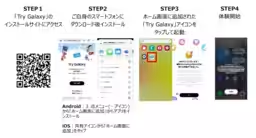
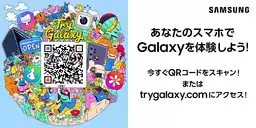
To access Try Galaxy, users simply need to scan a provided QR code with their smartphones, which allows them to add a shortcut to their home screen. This straightforward process empowers anyone with a smartphone to dive into the features of Samsung Galaxy devices anytime and anywhere.
When users launch the app, they are greeted with a Samsung Galaxy-styled home screen. By tapping on various apps, they can engage with a simplified version of the functionalities available on actual devices. The intuitive navigation and easy-to-use interface ensure a seamless experience for all users.
New Features Added to Try Galaxy
The latest update to the Try Galaxy app introduces exciting new features:
3D Experience
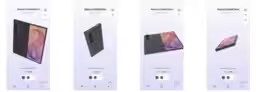
One of the standout improvements is the 3D experience feature, which allows users to rotate, zoom, and unfold the Samsung Galaxy Z Fold8 Ultra, Fold8, and Flip8 from any angle. Users can customize the color and get a realistic feel for how these devices would function in their hands.
User Interaction: Swipe to rotate, double-tap to unfold, and pinch to zoom for an immersive experience.
My Fan Cam
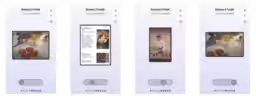
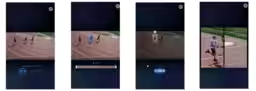
Another innovative addition is the My Fan Cam, which enables users to automatically track subjects in videos, refining adjustments to fit preferred aspect ratios effortlessly. This feature is perfect for creating content suitable for social media, bringing forth a new dimension to mobile videography.
User Interaction: Tap on the guidemark and select a person, then press Follow to create an optimized video centered on the chosen subject.
Immersive Viewing Experience
The Try Galaxy app also showcases the best screen ratios of the Samsung Galaxy Z Fold8 for an immersive viewing experience. With a 10:16 cover screen and a 4:3 main display, users can enjoy music, travel, and culinary content comfortably.
User Interaction: Icons allow users to switch between different display modes, showcasing vertical or horizontal orientations for a tailored viewing experience.
Exploring Additional Features
The app's update also includes enhanced functionality such as super stabilization, night graphy video, and a creative studio within the OS that users can test. This makes Try Galaxy an invaluable tool when considering which smartphone model might be right for them.
For anyone keen on exploring the unique features of the latest Samsung foldables, Try Galaxy is your key to experiencing high-tech innovation at your convenience.
Download Try Galaxy Now!
Explore all the features today by downloading via this link: Try Galaxy.
Key Links:
With the world-class features that Samsung continues to provide, the updated Try Galaxy app ensures everyone can discover what the future of smartphones holds.
- ---

Topics Consumer Technology)
【About Using Articles】
You can freely use the title and article content by linking to the page where the article is posted.
※ Images cannot be used.
【About Links】
Links are free to use.