




Yahoo! Advertising Introduces AI-Powered Quick Link Asset Feature
Yahoo! Advertising's AI-Driven Quick Link Asset Feature
On August 6th, LINE Yahoo Corporation launched an exciting new feature in its Yahoo! Advertising Search Ad platform: the AI-powered Quick Link Asset suggestion tool. This innovative feature allows advertisers to enhance their ads efficiently without incurring additional costs.
What is the Quick Link Asset?
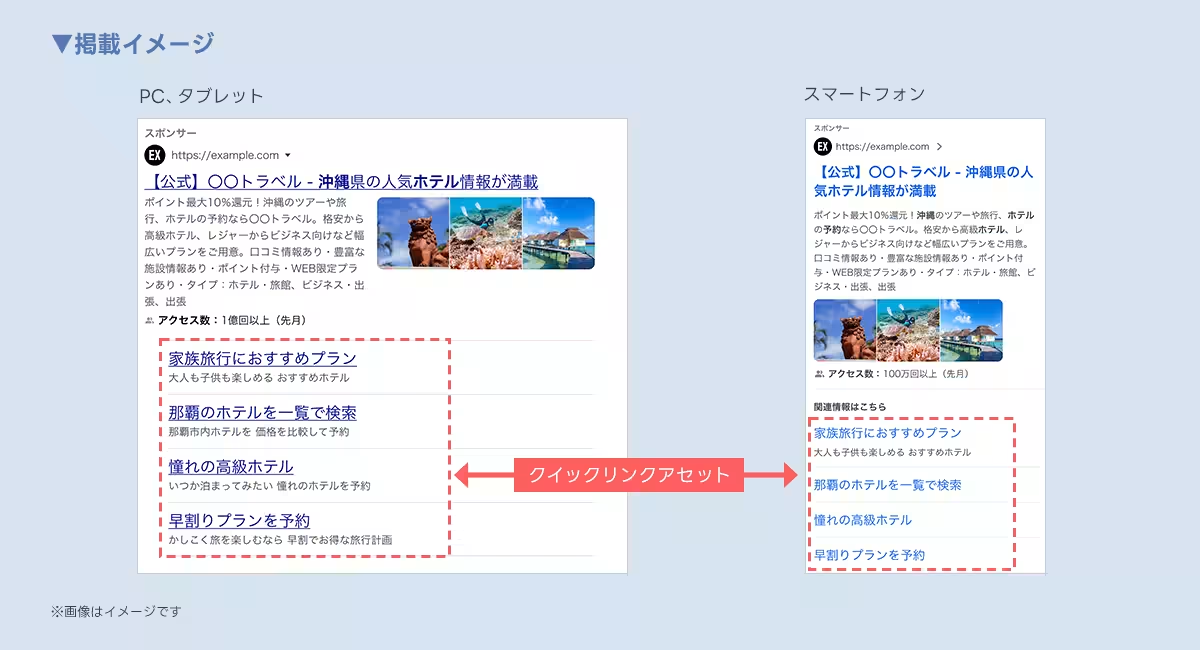
The Quick Link Asset feature enables advertisers to display links related to their ad titles at the bottom of the advertisement. This allows users to navigate directly to highly sought-after pages within websites, enhancing the chances of conversion. The essential elements of a Quick Link Asset include the link title (Quick Link Text), description (Quick Link Description), and final URL. Previously, advertisers had to manually generate this content, which could be time-consuming and cumbersome.
Streamlining Ad Creation with AI
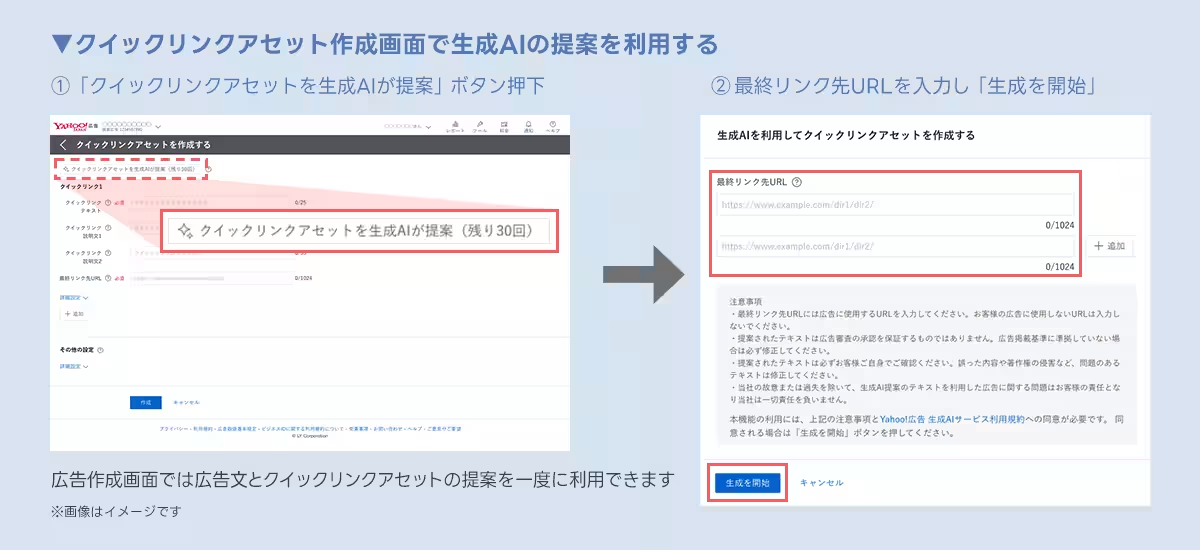
With the introduction of the new feature, LINE Yahoo facilitates advertisers by utilizing generative AI to create the title and description based on the final URL set within the Yahoo! Advertising management tool. Advertisers can easily edit the suggested content to suit their needs, making the process faster and more efficient.
In addition to the Quick Link Asset feature, advertisers also have access to other AI-driven tools that suggest ad copy and keywords. This consolidation of features will reduce the workload associated with ad setup, allowing advertisers to focus more on strategic planning rather than the technical details of ad creation.
A Commitment to AI Innovation
LINE Yahoo positions itself as an AI company dedicated to transforming services into AI Agents. By supporting the adoption of generative AI across various marketing solutions, the company aims to enhance productivity for all businesses, from large corporations to individual owners.
Notably, the AI-driven features are designed to optimize various advertising aspects. The Quick Link Asset, particularly, can help improve conversions by directing users to specific pages that may meet their needs more directly than a general homepage link.
How to Use the Quick Link Asset
To leverage this new feature, advertisers simply need to follow a few straightforward steps:
1. Access the advertisement management tool for Yahoo! Search Ads.
2. Select the “Create Display Asset” option and choose “Quick Link Asset” from the menu.
3. Click on “Generate Quick Link Asset with AI (Remaining X times)” at the top of the screen.
4. Input the final URL on the prompted screen.
5. Click “Start Generation.”
6. Review the generated content and finalize the Quick Link Asset.
Important Notes
It’s essential to keep in mind that the use of this feature is limited. Each account can utilize the Quick Link Asset generation feature up to 30 times a month. Once this limit is reached, advertisers must wait until the next month to access the service again.
Moreover, while the generative AI aims to produce reliable outputs, LINE Yahoo does not guarantee the quality or accuracy of the generated results. Advertisers are responsible for ensuring that the created content complies with advertising standards; any issues arising from the use of AI-generated creatives are at the advertiser's own risk.
The introduction of this AI-powered feature is a significant step for LINE Yahoo in providing efficient marketing solutions. By embracing AI technology, LINE Yahoo is helping businesses streamline their advertising efforts and contributing to a broader goal of increasing societal productivity as a whole.
For more details about the feature and its applications, please visit the following links:
- - Information on Quick Link Asset
- - AI-generated Title and Description Guide
- - AI-generated Keyword Guidance
As LINE Yahoo continues to develop its AI capabilities, the future of advertising looks promising, paving the way for innovative solutions that benefit businesses and consumers alike.

Topics Business Technology)

【About Using Articles】
You can freely use the title and article content by linking to the page where the article is posted.
※ Images cannot be used.
【About Links】
Links are free to use.