



A Revolutionary Tool to Automate Power Apps Screen Creation from Excel Designs
Introducing the Power Apps Automatic Screen Generation Tool
In an exciting development for businesses looking to leverage the power of low-code platforms, Media Fusion Co., Ltd. is set to officially launch its innovative "Power Apps Automatic Screen Generation Tool" by the end of April 2026. This tool enables seamless transformation of Excel design documents into fully operable entry screens and database structures within Microsoft 365's Power Apps, drastically simplifying the application development process.
The Challenge of Low-Code Development
Power Apps has garnered attention as a revolutionary low-code development environment, allowing users to create business applications with ease. However, the reality of development often involves complex settings and script writing, leading to challenges such as:
- - Dependence on Expertise: Development and maintenance can become highly specialized, making it difficult for non-technical staff to contribute effectively.
- - High Maintenance Costs: When updates or changes in data structure occur post-launch, significant resources are required for screen modifications and data migrations.
- - License Fees: Utilizing Dataverse for large-scale data management demands premium licensing, which can become expensive based on user numbers.
Revolutionizing the Development Process
Media Fusion's new tool addresses these critical challenges by allowing users to treat their familiar Excel sheets as the core system design document. This means that simply updating the design document will trigger automated generation of screens, database structures, and necessary data conversions, empowering business users to continuously maintain their Power Apps without technical hurdles. The introduction of this tool marks a substantial advance in the ongoing digital transformation initiatives of enterprises and organizations.
Key Features of the Power Apps Automatic Screen Generation Tool
1. Automatic Application Generation from Excel
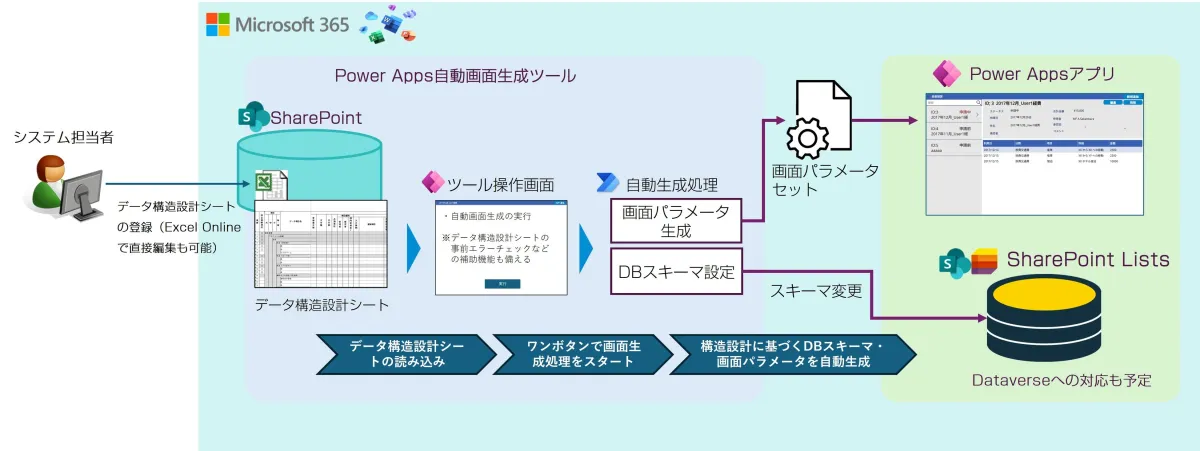
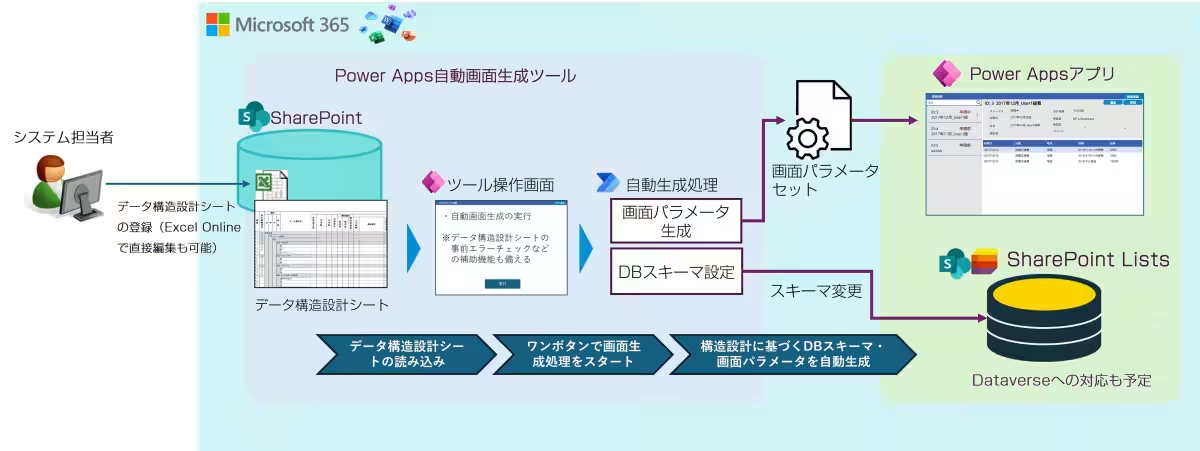
Users define item names, data types, display formats, and permissions directly within an Excel sheet. Importing this sheet will automatically generate the necessary schemas for SharePoint Lists as well as all views (lists, details, and input forms) within Power Apps.
2. Automated Structure Changes and Data Conversion
When new items or changes to the existing structure are required, users need only to update the Excel design document and rerun the tool. The system will automatically switch into maintenance mode and handle the transition from the old to the new structure without interruptions.
3. Large-Scale Data Management and Cost Reduction
The tool utilizes SharePoint Lists as a standard database, avoiding the additional licensing fees usually associated with large-scale data management solutions. Moreover, Media Fusion's unique technology for building a decentralized database enables expansive operations at a lower cost, overcoming the limits imposed by traditional Lists setups.
Advantages of the Automatic Screen Generation Tool
Designed with user-friendly functionality, this tool empowers system administrators without requiring them to have specialized engineering skills:
- - No Technical Hurdles for Changes: System administrators can handle operational adjustments independently.
- - Seamless Integration: As users update their design documents, the tool automatically generates all necessary changes including screens, databases, and data conversions. Testing changes before implementation is also facilitated.
- - Flexibility in Database Selection: While the tool defaults to using SharePoint Lists, it allows parallel processing across multiple Lists to tackle large datasets. Future enhancements may enable compatibility with Dataverse as needed.
Implementation and Future Vision
The "Power Apps Automatic Screen Generation Tool" is inspired by the technology behind Media Fusion's long-established MF Instructor Performance Management System. Its transition to Power Apps aims to simplify the development process further, ensuring that companies and universities can benefit from a more efficient system.
The upcoming release will feature a comprehensive suite of functionalities designed to streamline business operations and reduce costs associated with existing systems. By allowing Excel to serve as a design document, Media Fusion pursues a vision of eliminating inefficiencies traditionally found in business applications. Through initiatives like this and others, Media Fusion is leading the charge in the Software as a Service (SaaS) Extension as a Service (SEaaS) conceptualization, fostering a new wave of digital transformation across various sectors.
Example Flow of Generating Screens Using the Tool
The integration process encompasses the whole cycle—creating, modifying, and operating business applications—underlining the ease of use and efficiency brought forth by this innovative solution.
Conclusion
Media Fusion Co., Ltd. remains committed to supporting organizations in optimizing their operational capabilities through advanced digital solutions. Stay tuned for the official launch in April 2026, which promises to reshape how businesses approach application development using Power Apps.
For those eager to learn more or inquire about the product, additional details will be unveiled on our website upon the release. Meanwhile, companies interested in harnessing this technology are encouraged to contact us for consultations.
Topics Consumer Technology)

【About Using Articles】
You can freely use the title and article content by linking to the page where the article is posted.
※ Images cannot be used.
【About Links】
Links are free to use.