



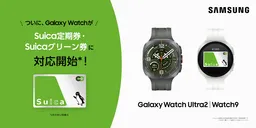
Enhancements in Samsung Galaxy Watch Series with Suica Ticketing Features
Samsung Galaxy Watch Series Enhancements
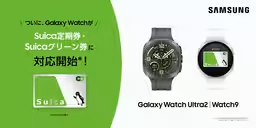
Samsung Electronics Japan has announced an exciting expansion of services for certain models in the Samsung Galaxy Watch series. Users can now access the services provided by East Japan Railway Company's IC card, Suica, directly from their smartwatch, making commuting and travel even more convenient.
What's New?
With the latest software update, users are able to operate and check their Suica directly from the mobile Suica app on their Android devices. Previously, users could only charge their Suica on the watch itself; now, they can also charge their account, purchase commuter tickets, Green Tickets, and discount tickets from their mobile devices. This update not only enhances functionality but also streamlines the commuting experience for Samsung Galaxy Watch users.
Note: To access these new features, users must ensure that their watch's software, Galaxy Wearable app, and Google Wallet are all updated to the latest versions, along with the mobile Suica app and relevant system applications.
Compatible Samsung Galaxy Watch Models
The following models of Samsung Galaxy Watch are compatible with the new Suica services:
- - Samsung Galaxy Watch Ultra | Watch Ultra2
- - Samsung Galaxy Watch9
- - Samsung Galaxy Watch8 | Watch8 Classic
- - Samsung Galaxy Watch7
- - Samsung Galaxy Watch6 | Watch6 Classic
This service is limited to models sold in Japan, with plans for further expansion to more devices in the future. Users will also need to have an Android device to pair and manage their smartwatch.
Overview of Services
With the Samsung Galaxy Watch supporting Suica, users can perform the following:
- - Charge their Suica via registered credit cards in the mobile Suica app.
- - Purchase commuter tickets seamlessly.
- - Buy Suica Green Tickets.
- - Access special discount tickets.
To utilize these services, users must download and log into the mobile Suica app, ensuring a smooth experience.
How to Set Up Suica
1. For New Users: If this is your first time setting up Suica on your smartwatch:
- On Your Android Device (using mobile Suica app):
1. Open the Osaifu-Keitai app and tap on “Check/Change Main Card.”
2. Select “Deposit Card (Change Devices)” and deposit your card.
- On Your Smartwatch:
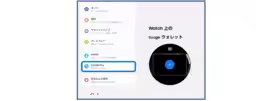
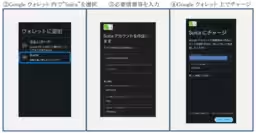
1. Open the Google Wallet app.
2. Tap the [+] button, and follow the prompts on your paired smartphone to add Suica.
2. For Existing Users: If you already have a Suica issued on your smartwatch:
- The Suica will automatically display in your mobile Suica app on your Android device;
- Confirm the pairing state with the clock icon in the top left corner of the Suica card.
Issuing Suica
To issue a new Suica card:
1. In the Galaxy Wearable app, tap the menu button and select Google Pay, or select “Add Card” in the Google Wallet app on your watch.
2. Complete the issuance and registration of your commuter ticket, along with any required information.
For Further Information
- - For details about the latest Samsung Galaxy Watch model, Samsung Galaxy Watch9
- - For information on the recently released Samsung Galaxy Watch Ultra2
- - Explore more about the complete Samsung Galaxy Watch series.
Disclaimer: “Samsung Galaxy” is a registered trademark of Samsung Electronics Co., Ltd. “Suica” and “Mobile Suica” are registered trademarks of East Japan Railway Company. Other brand names and service markings mentioned are the respective trademarks of their companies.
Topics Consumer Technology)
【About Using Articles】
You can freely use the title and article content by linking to the page where the article is posted.
※ Images cannot be used.
【About Links】
Links are free to use.