



MSI’s GPU Safeguard+ Now Supports Afterburner for Enhanced Safety
MSI Enhances Safety with GPU Safeguard+ Integration
MSI has recently launched significant updates for its latest power supply units, specifically the MPG Ai1300TS PCIE5 and MPG Ai1600TS PCIE5. These updates focus on enhancing user safety through the introduction of the MSI GPU Safeguard+ technology. This innovative feature closely monitors the current flowing through each pin of the 12V-2x6 cables in real-time. If any discrepancies or imbalances in current are detected, the power supply unit emits a beep and the MSI Center software alerts users to check the connector’s proper attachment or inspect the cable for any defects. In the case that the issues persist, the power supply automatically shuts down to protect the graphics card from potential damage.
Along with MSI Center, the GPU Safeguard+ now has added support for MSI Afterburner, following the latest update. If abnormal current levels are spotted, GPU Safeguard+ promptly notifies Afterburner, which in turn displays a warning. More importantly, it automatically reduces the Power Limit of the graphics card to 75%, ensuring the safety of the system.
Steps to Adjust GPU Power Limit during Current Imbalance
To demonstrate the procedure, let’s take the MPG Ai1600TS PCIE5 as an example:
1. Install Afterburner, then open the application.
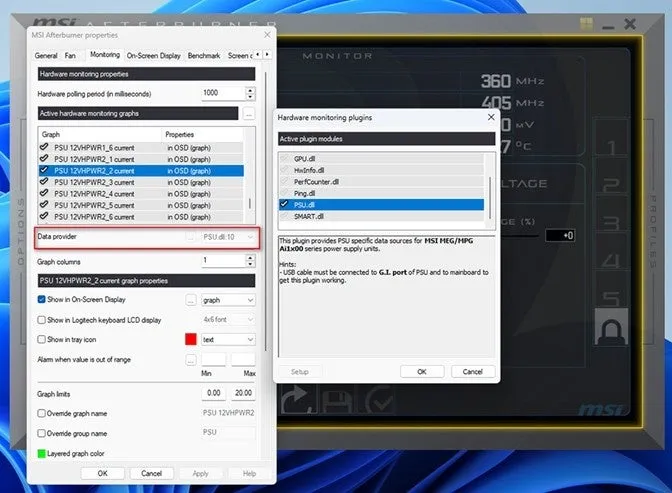
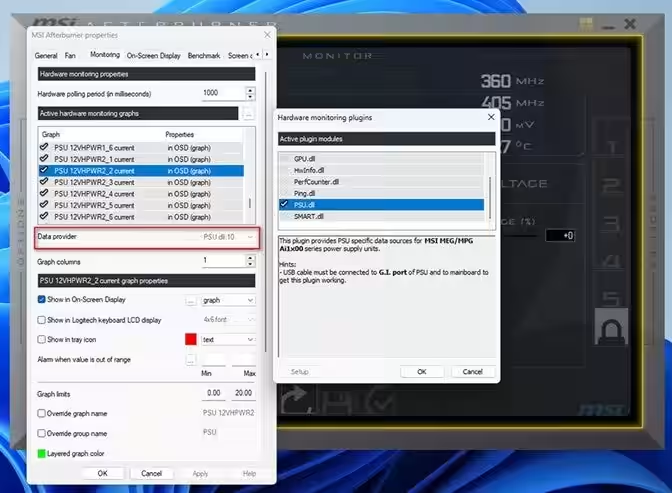
2. Switch to the ‘Settings’ menu and navigate to the ‘Monitoring’ tab.
3. In the ‘Data provider’ section, load ‘PSU.dll’.
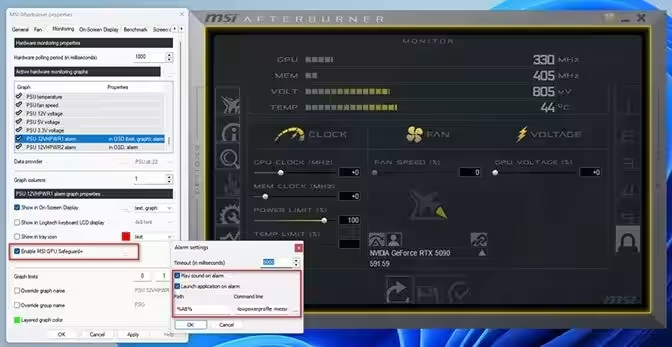
4. Within the ‘Monitoring’ tab, select either ‘PSU 12VHPWR1 alarm’ or ‘PSU 12VHPWR2 alarm’. Check the option ‘Enable MSI GPU Safeguard+’.
5. Click the button next to this option and check ‘Launch Application on alarm’, then load the ‘lowpowerprofile’ setting provided by Afterburner.
Once these settings are configured, if the power supply detects any abnormal current, MSI GPU Safeguard+ will signal continuous beeping. Simultaneously, Afterburner will execute the ‘lowpowerprofile’ command, pulling down the GPU’s power limit to a safer level of 75%.
Important Considerations
The MPG Ai1600TS PCIE5 is equipped with two 12V-2x6 connectors. If you are utilizing only one, ensure that the Afterburner alarm settings (PSU 12VHPWR1 or PSU 12VHPWR2) correspond to the connector you are actively using.
To utilize the MSI GPU Safeguard+ feature, MSI Afterburner version 4.6.7 or later is required. In case of abnormal or imbalanced current, immediately shut down the system. Be sure to check the connection status of the 12V-2x6 connectors and inspect the cables for any possible damage.
By enabling MSI GPU Safeguard+ within the ‘Monitoring’ tab, you can lower the GPU's power limit when imbalance in current across the 12V-2x6 pins occurs.
Supported Models for MSI GPU Safeguard+
1. MPG Ai1600TS PCIE5 (Not yet released domestically) - Learn More
2. MPG Ai1300TS PCIE5 (Upcoming release) - Learn More
3. MSI Afterburner v. 4.6.7 or newer - Download Here
For those keen on keeping up-to-date with MSI’s news and product releases, you can subscribe via RSS through your preferred reader or browser. This will ensure you receive the latest updates promptly.
To find out more about MSI, visit:
- - MSI Homepage
- - MSI YouTube Channel
- - MSI Girls Channel
- - MSI Facebook
- - MSI Instagram
- - MSI PC Parts on X
- - MSI Notebooks & Monitors on X
About MSI
MSI is recognized as a leading gaming brand and a trusted vendor within the gaming and eSports sectors. MSI adheres to core principles of design innovation, performance excellence, and technological advancement. By developing products that integrate features desired by gamers, MSI strives to deliver superior performance and liberate gamers from the constraints of past trial and error. With unwavering determination to surpass historical achievements, MSI continues to be a “True Gaming” brand characterized by a strong gaming spirit.
Topics Consumer Technology)
【About Using Articles】
You can freely use the title and article content by linking to the page where the article is posted.
※ Images cannot be used.
【About Links】
Links are free to use.