




Yahoo Weather App Introduces User-Generated Content Widget for Android Users
Yahoo Weather App's Innovative User-Generated Content Widget
LINE Yahoo Corporation has taken a significant step in enhancing its popular Yahoo Weather app, which boasts over 68 million downloads. The recent addition of the "Everyone’s Posts" widget, tailored exclusively for Android users, enables users to stay informed about real-time weather conditions in their areas without needing to open the app. This new functionality is available starting from version 11.12.1 of the app.
Widget Features
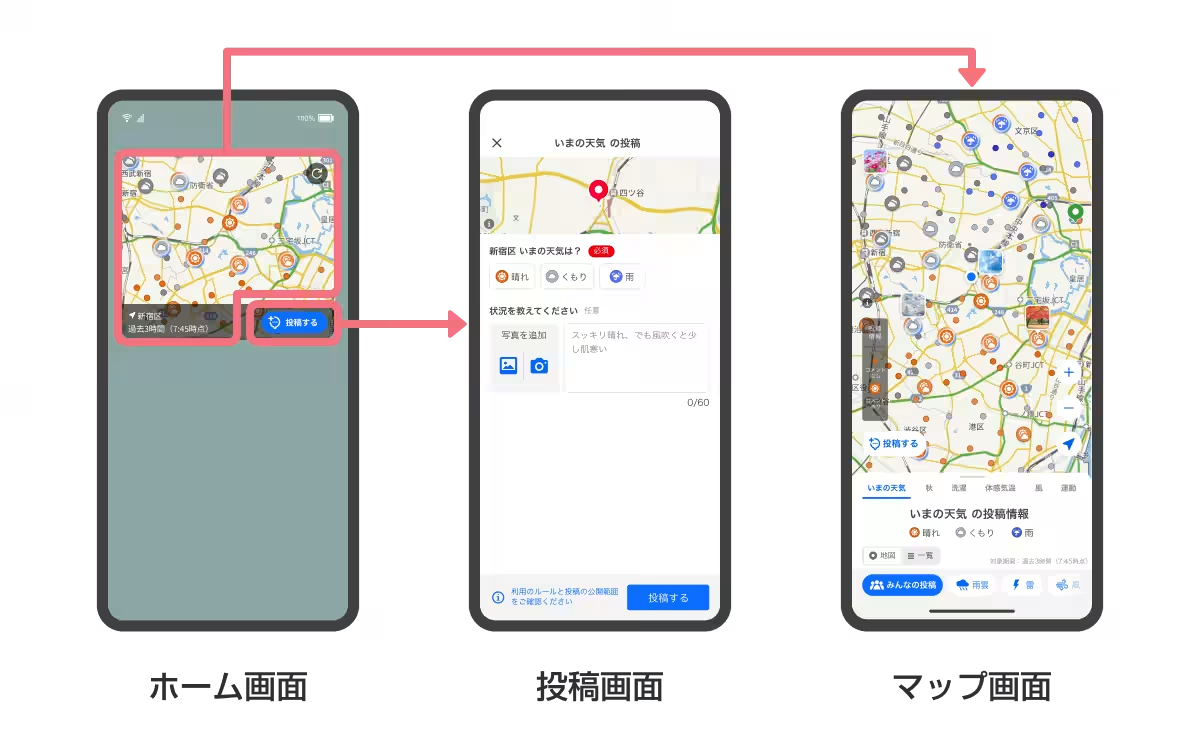
The key feature of the Everyone's Posts widget is its ability to provide immediate insights into local weather conditions through user-generated posts. This is particularly beneficial during unpredictable weather patterns, allowing users easy access to relevant weather information and preparation tips. By tapping the map section of the widget, users can seamlessly transition to the app's Everyone’s Posts mode, and if they have set their registered location to their current position, a post button appears in the bottom right corner, making posting effortless with just a tap.
Moreover, the widget employs a responsive design that adjusts based on screen size. Users can conveniently modify the display size to fit their preferences. The map view offers three levels of detail: broad, standard, and detailed, and users can switch between light and dark modes, allowing for further customization depending on their preferences and usage environments.
Weather Preparedness
The introduction of the Everyone's Posts mode is timely, given the recent rise in unstable weather phenomena such as sudden torrential rains and rapid temperature changes. The feature serves as a valuable tool for users to assess weather conditions and make informed decisions. This mode was revamped in February 2025, evolving from its previous version, “Everyone’s Weather,” and allows users to view weather posts directly on the same map as the rain cloud radar. Users can easily switch between modes to browse through real-time weather posts contributed by other users, which has brought attention on social media for its enjoyable and casual nature. Additionally, as of September, the app has integrated a photo-sharing feature, further enhancing user interaction and engagement.
How to Set Up the Widget
Setting up the Yahoo Weather widget on your smartphone is straightforward:
1. Long-press an empty area on your smartphone’s home screen and choose "Widgets."
2. Select the Yahoo Weather (Y! Weather) widget from the list.
3. Pick the widget type, press and hold it to place it on your home screen.
4. To change the widget size, long-press on the existing widget. Additional settings can be updated through the app’s menu under “App Settings” > “Widget Settings.”
Commitment to User Experience
LINE Yahoo’s mission is to create a "WOW" life platform that brings excitement to daily routines. With the ongoing enhancements to the Yahoo Weather app, the company aims to support users with services that contribute to a safe and comfortable lifestyle. The continuous updates and features reflect its commitment to improving user experience and staying attuned to the community's needs.
For more information and to download the Yahoo Weather app, visit: Yahoo Weather App.

Topics Consumer Products & Retail)
【About Using Articles】
You can freely use the title and article content by linking to the page where the article is posted.
※ Images cannot be used.
【About Links】
Links are free to use.