



Revolutionizing Event Check-Ins: The New QR Code Feature of Tsudle
Tsudle's Innovative QR Code Check-In System
The recent addition of a QR code check-in feature to Tsudle's cloud-based event reservation management system promises to significantly enhance event operations. Provided by Reserve Link Inc., located in Minato, Tokyo, this new functionality is designed to streamline the registration process during events, thereby reducing waiting times and improving the overall experience for attendees.
Overview of the QR Code Check-In Feature
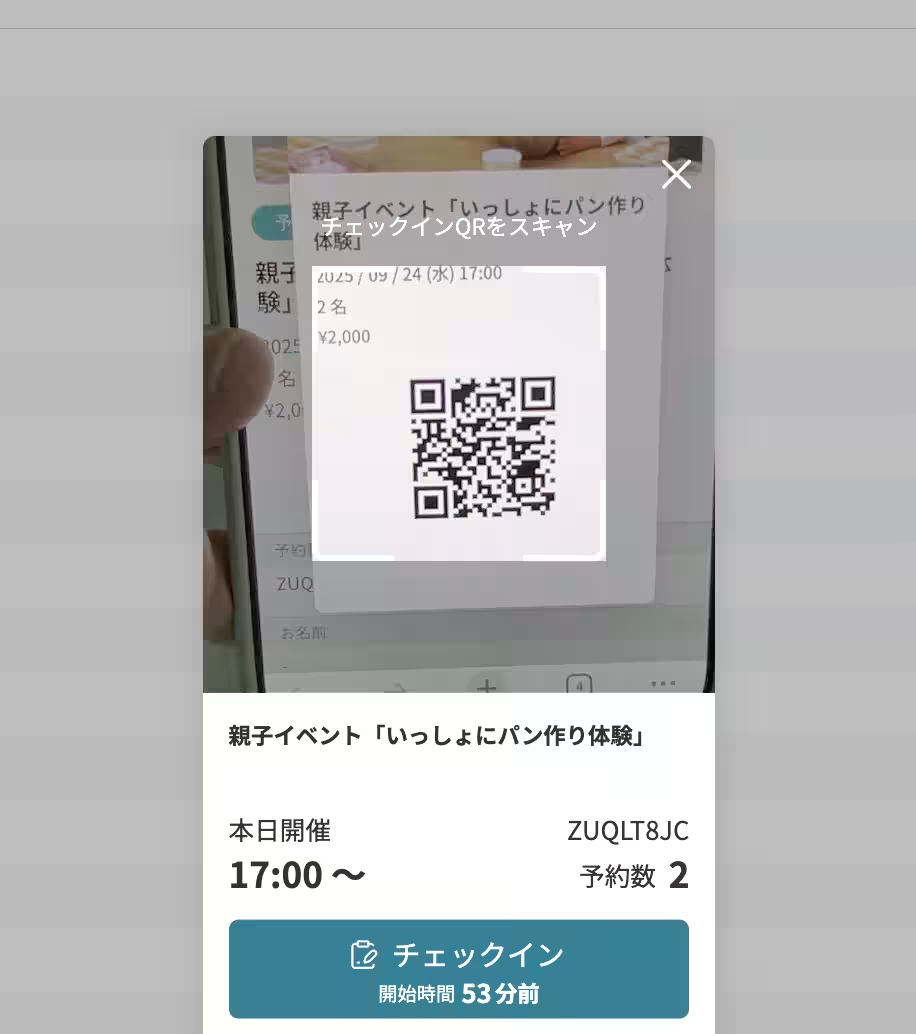
The newly implemented QR code check-in allows participants who register for events in advance to simply present a QR code at the registration desk. Staff members can then scan this code to confirm the reservation details and complete the check-in process. This innovation is particularly beneficial for seminars, lectures, and exhibitions, where high attendance is expected. Compared to traditional paper-based lists, using QR codes can drastically reduce waiting times and improve efficiency during registration.
The Need for Change in Event Check-In Processes
In events such as seminars, trade shows, or corporate gatherings, managing the registration process for a large number of attendees can be quite challenging. Previously, using paper attendee lists or manual entry could result in delays, creating longer wait times for guests and adding to the workload of the reception staff. For larger gatherings hosting several hundred participants or workshops that require multiple quick rotations, any delays in processing check-ins could significantly disrupt the event's flow.
To address these issues, the QR code check-in feature was developed. This system allows pre-registered attendees to check in effortlessly by merely displaying their QR code. The dual benefits of confirming attendance and verifying reservation details are achieved simultaneously.
Features and Specifications
The main features of Tsudle's QR code check-in system include:
1. For Attendees:
- A QR code for check-in is displayed on the reservation confirmation screen on the reservation site.
2. For Event Organizers:
- Check-in capability can be activated simply by enabling the QR check-in on the management dashboard.
- By clicking the



Topics Business Technology)
【About Using Articles】
You can freely use the title and article content by linking to the page where the article is posted.
※ Images cannot be used.
【About Links】
Links are free to use.