



Enhance Your Skills with Free Word Course: Master Mail Merge and Document Review
Improve Your Word Skills with C&R's Free Online Seminars
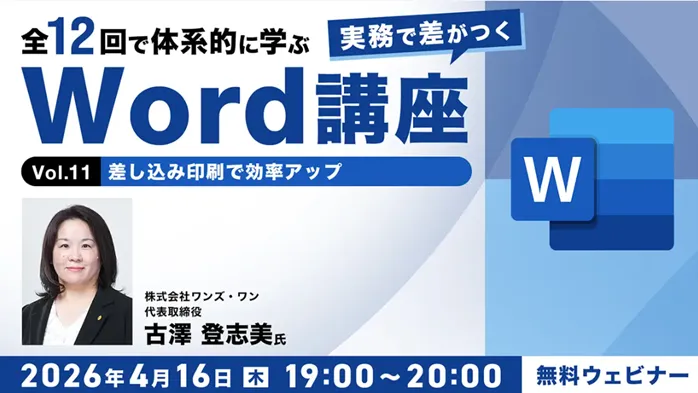
If you regularly use Microsoft Word for creating reports, resumes, or flyers, you won't want to miss the upcoming free online seminars offered by C&R Corporation. These sessions, titled "Practical Word Course Vol. 11 & 12," are aimed at individuals who are intermediate users of Word and want to enhance their professional documentation skills.
Overview of the Seminars
The seminars are scheduled to take place on two dates: April 16 and April 30, 2026. They will provide valuable insights into efficient document creation techniques and help participants understand the various functionalities Word offers. Both sessions are back-to-back, with each focusing on critical aspects that can significantly elevate your Word expertise.
Seminar Details:
- - Vol.11: April 16, 2026, from 7:00 PM to 8:00 PM. Topic: "Boost Efficiency with Mail Merge."
- - Vol.12: April 30, 2026, from 7:00 PM to 8:00 PM. Topic: "Document Review, Protection, and PDF Output."
Session Descriptions
Vol. 11: Boost Efficiency with Mail Merge
This session focuses on teaching participants the fundamentals of mail merge, highlighting how it can streamline document generation for bulk communications. Attendees will learn about:
- - Basic mail merge functions, including creating address labels
- - Integration with Excel data for more personalized document creation
- - Settings and editing of merge fields for accuracy and customization
Participants will leave with the skills to implement mail merge effectively, saving valuable time and enhancing productivity in their daily tasks.
Vol. 12: Document Review, Protection, and PDF Output
The final session will cover essential tools for ensuring document accuracy and security. Key takeaways include:
- - Utilizing comments and tracking changes for effective collaboration
- - Implementing document protection features, including editing restrictions and templates
- - Exporting documents to PDF and setting up print configurations
This session is particularly beneficial for those looking to refine their document preparation methods and enhance their final output's professionalism.
Who Should Attend?
These sessions are perfect for:
- - Individuals using Word without formal training and looking for a structured approach to learning.
- - Professionals who frequently rely on Word in their work and need to deepen their understanding of its features.
- - Anyone interested in improving their skills systematically and effectively.
Expert Instruction
Both seminars will be led by Toshimi Furusawa, CEO of Ones-One and a certified IT coordinator and small business consultant. With over two decades of experience providing PC support and conducting IT seminars, Furusawa-san specializes in making complex topics accessible for beginners. His commitment to enhancing productivity in businesses through technology is reflected in his engaging teaching style.
Registration Information
These seminars are free, but participants must register in advance due to limited availability (60 slots per session). To secure your place, visit the links below:
- - Register for Vol. 11: Mail Merge (Deadline: April 16, 2026, 8:00 PM)
- - Register for Vol. 12: Document Review (Deadline: April 30, 2026, 8:00 PM)
Don’t miss this opportunity to enhance your Word skills and improve the quality of your work. We look forward to seeing you online!
About C&R Corporation
Founded in 1990, C&R Corporation has established itself as a pioneer in the creator agency sector, providing career support and skill enhancement through various seminars and workshops. We sustain our mission of increasing the lifelong value of professionals while creating environments that allow individuals to maximize their potential through learning and development opportunities.

Topics Consumer Products & Retail)






【About Using Articles】
You can freely use the title and article content by linking to the page where the article is posted.
※ Images cannot be used.
【About Links】
Links are free to use.