



Mavericks Launches Collaborative Editing Feature in NoLang AI for Seamless Video Production
Mavericks Launches Collaborative Editing Feature in NoLang AI for Seamless Video Production
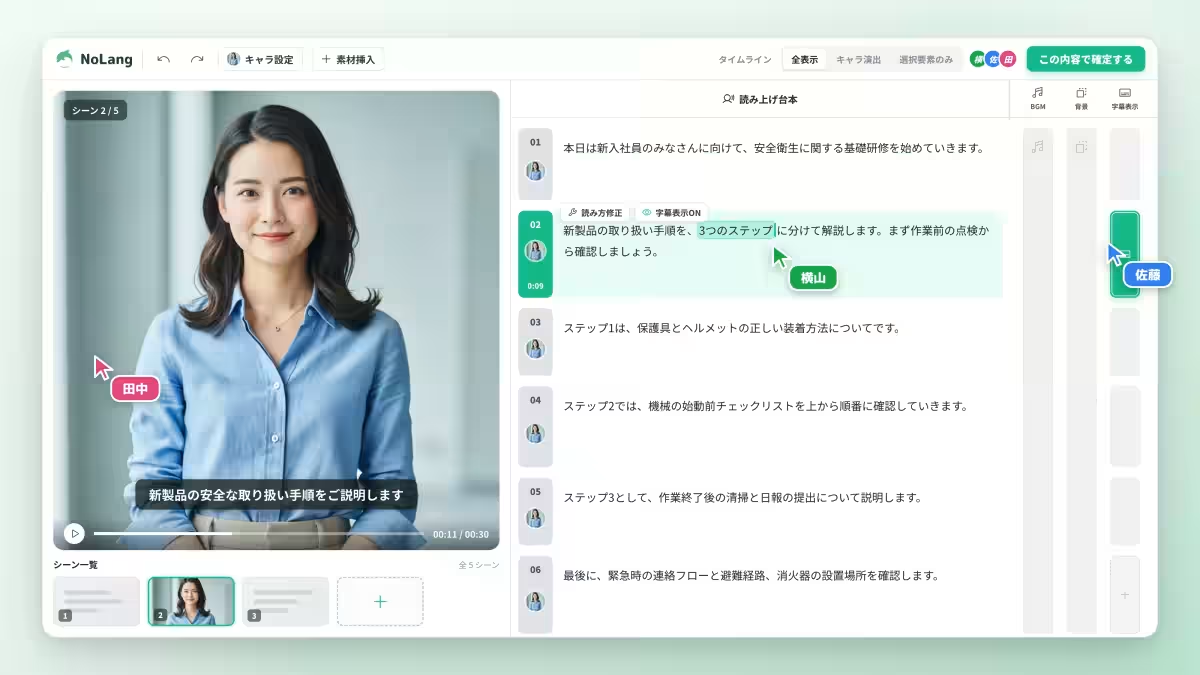
Mavericks, a company based in Bunkyo, Tokyo, recently announced the official launch of a game-changing feature in their video generation AI, NoLang. This new capability allows multiple team members to edit the same video project simultaneously, marking a significant step forward in collaborative video production. With real-time updates, all members can see edits reflected instantly on their screens without facing obstacles such as file locks or waiting in line to edit.
Revolutionizing Collaborative Video Editing
Gone are the days of sending files back and forth or dealing with version management issues that often hinder teamwork. Every change made by an individual is immediately visible to the entire team, allowing for a fluid workflow. This is particularly beneficial in the realm of corporate content creation where efficiency is crucial. As many as one out of three people has experience in content creation, according to a survey conducted by Nikkei BP Consulting in March 2024, indicating a growing number of individuals participating in such projects.
One of the common pain points for companies has been how to manage files and ensure everyone is on the latest version—often a time-consuming process. A survey by Fleekdrive conducted in March 2026 revealed that 57.6% of respondents found distinguishing between old and new files challenging. Such issues are exacerbated when video files are involved, which tend to be larger and require more effort to review. The introduction of NoLang addresses these inefficiencies directly by allowing for simultaneous editing, significantly reducing the administrative burden on teams.
Features of NoLang’s New Functionality
1. Real-Time Edits: Team members can edit from their devices in real-time while seeing all changes reflected instantly on their screens. No more confusion over which file is the latest, as everyone has access to the same updated state.
2. Independent Undo/Redo Functionality: A common fear with collaborative editing is the potential to overwrite someone else's work when using the

Topics Other)





【About Using Articles】
You can freely use the title and article content by linking to the page where the article is posted.
※ Images cannot be used.
【About Links】
Links are free to use.