



Samsung Launches Updated Try Galaxy App for S26 Series AI Features
Samsung Revamps Try Galaxy App for Enhanced AI Experience
On March 19, 2026, Samsung Electronics introduced an exciting update to its popular application, Try Galaxy. Available in 125 countries and supporting 25 languages, this app allows smartphone users worldwide to explore the advanced AI capabilities of the newly launched Samsung Galaxy S26 Series. Users can dive into the transformative features of the latest OS, One UI 8.5, right on their personal devices.
What is Try Galaxy?
Try Galaxy is a simulation app that grants users a taste of the Samsung Galaxy experience, highlighting innovative features without the need for a physical Galaxy device. Since its launch in 2022, the app has garnered an impressive 81 million downloads, showcasing its global appeal. With the recent update, users can immerse themselves in the extraordinary Galaxy AI functionalities now available on the Samsung Galaxy S26 Series.
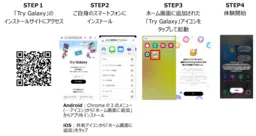
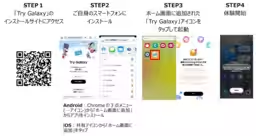
This app works seamlessly on both Android and iOS platforms, making it accessible to a broad audience. Users can simply scan a QR code to add a shortcut to their home screen and embark on a virtual journey through Samsung's latest offerings. Upon launching the app, a Samsung Galaxy-style home screen greets users, allowing easy navigation through various app functionalities.
Key Features to Experience
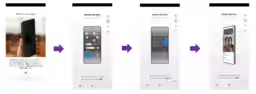
Among the most notable additions in the updated Try Galaxy app is the impressive Privacy Display feature, a pioneer in the mobile industry. Samsung Galaxy S26 Ultra introduces this cutting-edge technology designed to safeguard user privacy at a pixel level. With just a simple adjustment in settings, users can confidently utilize their screens in public spaces without fear of prying eyes, as the display automatically adjusts based on the surrounding environment and the app in use.
To experience this feature, users can tap on Privacy Display from the home screen and follow the prompts to visualize the privacy features in action.
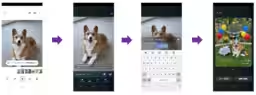
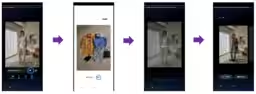
Another remarkable improvement comes from the upgraded Photo Assist functionalities. Now, users can effortlessly edit images by simply expressing their intentions in words, allowing for a more intuitive editing process.
For instance, one feature called Photo Assist - Text to Image Generation lets users create an image based on their input, such as generating a picture of a “birthday dog at a garden party.” Additionally, Image Composition allows users to seamlessly add other images into their pictures, with AI ensuring that the added items blend naturally.
Along with these, the app also showcases fantastic advancements like enhanced Super Steady Video stabilization and Nightography video capabilities, all aimed at providing users with a comprehensive preview of what the Galaxy S26 Series has to offer.
How to Download
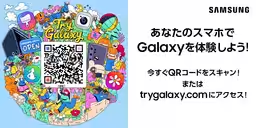
Getting started is easy. Users can visit the Try Galaxy website or scan the provided QR code for direct installation. This interactive platform helps potential buyers explore the intricacies of the Galaxy interface and its various applications before making a purchasing decision.
Conclusion
As Samsung continues to push boundaries in mobile technology, the revamped Try Galaxy app presents an invaluable opportunity for users to engage with new features of the Samsung Galaxy S26 Series. Its availability across major platforms means that anyone interested can have a first-hand experience of what Samsung has to offer far beyond hardware capabilities. Download the app today and explore the future of mobile technology with Samsung!
Important Links
For more information and updates, keep an eye on Samsung's official channels.

Topics Consumer Technology)
【About Using Articles】
You can freely use the title and article content by linking to the page where the article is posted.
※ Images cannot be used.
【About Links】
Links are free to use.