




Samsung Galaxy's Refreshed Free App 'Try Galaxy' Lets Users Experience AI Features
Samsung Refreshes the 'Try Galaxy' App
Samsung Electronics Japan has recently launched an updated version of the 'Try Galaxy' app, allowing users to explore the impressive AI functionalities of the Galaxy Z Fold7 and Z Flip7. This innovative app makes it possible for users to experience the latest features of Samsung's devices using their own smartphones. The upgrade includes the latest AI capabilities and the new operating system, One UI 8, alongside advancements in the Samsung Galaxy Watch8 and Watch8 Classic, as well as the Galaxy Watch Ultra planned for 2025.
Starting on August 1, this unique virtual experience brings the cutting-edge technology showcased in these devices to a broader audience. The 'Try Galaxy' app supports 125 countries and 25 languages and has accumulated more than 61 million downloads since its launch in 2022. Users can utilize it on both Android and iOS devices, allowing for a seamless exploration of the latest Galaxy advancements.
Experience Samsung Galaxy Features Virtually
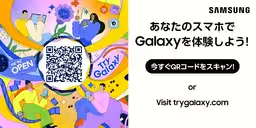
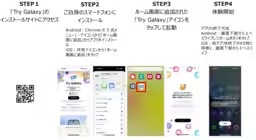
Notably, the 'Try Galaxy' app is user-friendly. Even those without Samsung Galaxy smartphones can easily access it by scanning a QR code to add a shortcut to their home screen. Once launched, the app displays a Galaxy-themed home screen where users can tap various app icons to sample simplified versions of the functionalities, making it a straightforward and enjoyable experience.
Key Features of the 'Try Galaxy' Update
The latest version of 'Try Galaxy' shines with new AI experiences, including impressive features such as Gemini Live and Photo Assist.
Gemini Live
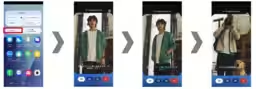
This feature leverages multi-modal AI to understand user interactions better by recognizing visual inputs, verbal cues, and actions. Users can simply pose questions, either through text or voice, and receive tailored answers without needing to navigate away from their current app. The screen-sharing and camera-sharing capabilities allow users to demonstrate objects in real-time for instant feedback from Gemini. In the app, users can easily access this feature and see how they might ask Gemini for outfit suggestions based on the weather or their planned activities.
Photo Assist
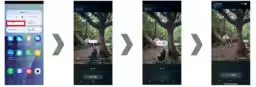
Next, the Photo Assist feature utilizes AI to enhance the editing experience, providing tools for object movement, removal, resizing, and background correction with remarkable accuracy. This includes enhancements for taking lively pet portraits and utilizing advanced generative AI for seamless photo editing. Notably, the AI can suggest objects to remove automatically, allowing for easy one-tap deletion.
3D Interactive Experiences
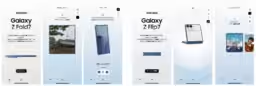
An exciting addition allows users to interact with a 3D model of the Galaxy Z Fold7 and Z Flip7, offering a 360-degree view to simulate the feel of holding the device. Users can tap the specific icons within the app to view different colors and covers while understanding the display properties online.
In addition to these features, users can also try out the improved Galaxy AI functions, such as audio eraser, instant slow motion, and AI sketching, alongside virtual simulations of wearable devices and the Samsung Health app.
Download and Accessibility
Accessing the 'Try Galaxy' app is simple – just visit this link to download it, or use the QR code provided in the app's promotional material.
For more information about the specific devices featured, users can refer to the pages detailing each product:
The 'Try Galaxy' app stands as a testament to Samsung's commitment to accessibility and innovation, allowing everyone to explore their groundbreaking technology without having to own the devices themselves.

Topics Consumer Technology)
【About Using Articles】
You can freely use the title and article content by linking to the page where the article is posted.
※ Images cannot be used.
【About Links】
Links are free to use.